iPhone · iPad · Mac
A dictaphone for thinking out loud.
Signal Recorder SR-7 is a voice recorder that transcribes on the iPhone, iPad or Mac in your hand.
$7.99 once for iPhone, iPad and Mac. No subscription.


Uses
For the thought that shows up at the wrong moment
Ideas arrive on the walk to a meeting, in a corridor, with a book open. The record button sits at the bottom of every list, so keeping a thought takes one tap and no typing.
Between meetings
Say the three things you want to land while you walk to the room. By the time you sit down, the recording has a transcript and a title.
Leaving the room
Decisions fade within the hour. Record them in the corridor and the recap is searchable by the time you reach your desk.
After an interview
Record your read on a research call while it is fresh. After the sixth debrief, search all of them for the pattern.
With a book open
Read the line aloud, then say why it matters. The quote and your reaction end up in the same recording.
At the end of the day
Two minutes of reflection each evening becomes a journal you can search for the days that went sideways.
The small stuff
Dry cleaning on Thursday, the passport form on the counter, the idea you had in the shower. Small thoughts get a title too.
The app
One library on iPhone, iPad and Mac
One purchase covers all three devices. Switch on iCloud sync, and a recording you make on your phone during a walk is waiting on your Mac, transcribed, when you sit down.
Sync that you switch on
iCloud sync keeps recordings, transcripts and projects in step across your devices. It is off until you turn it on, on each device, and you choose whether audio files travel too.
Search every word
Search covers file names, titles, summaries and full transcripts, so the thing you said three weeks ago is one query away.
Playback at your pace
Listen back at 0.5× to 2× and skip 15 seconds either way. Sort recordings into projects, star the ones you come back to, or leave them in the Inbox.
Signal path
Where your recordings go
Every step from microphone to file runs on your own devices, and sync, if you want it, goes through your own iCloud. Here is each step and where it runs.
-
1
Record
Record in the app, or import audio from another recorder.
Your device -
2
Transcribe
Apple's on-device speech framework turns the audio into text.
On device -
3
Title and summary
Apple's on-device models write a title and one sentence. This needs Apple Intelligence.
On device -
4
Store
Your library lives on the device. On the Mac it can also mirror to a folder of markdown files.
Your disk -
5
Sync, if you want it
Off until you switch it on. CloudKit carries your library between your devices through your iCloud account. Audio is optional.
Your iCloud
Not in the path
- An SR-7 account
- Servers of ours
- Analytics or telemetry
The only thing that reaches our server is feedback you choose to send. The App Store privacy label for SR-7 reads Data Not Collected.
Files · Mac
On the Mac, every recording is also a markdown file
Pick a location in Settings, under Library, and SR-7 creates an SR-7 Library folder there: a folder per project and a markdown file per recording, with YAML front matter on top.
Put that folder inside an Obsidian vault, commit it to git or point a script at it. SR-7 manages the folder: it rewrites a file when its recording changes and removes files it did not write, so edit in the app and treat the folder as read-only.
- The
uuidstays the same when a title changes, so a script can match a renamed file to its recording. - Audio can live beside the text in a hidden
.audio/folder. Add it to.gitignoreif you track the library. - A README in the folder explains the format to anyone, or any tool, that finds it.
---YAML front matteruuid: 5C8F7A20-91D3-4B6E-A2F4-7E1B0D38C9A6Stays the same when the title changescreated: 2026-09-24T08:07:31ZISO 8601, UTCduration: "0:08"Length of the recordingaudio: .audio/5C8F7A20-91D3-4B6E-A2F4-7E1B0D38C9A6.m4aPresent for recordings, not typed notesfavorite: trueOnly when you star the recording---# Urgent Tasks for This WeekendTitle, written on the device> Pick up dry cleaning and renew passport before they're forgotten.One-sentence summaryUh, pick up the dry cleaning Thursday.
And the passport renewal form is sitting on the counter, do it this weekend before it gets buried.The transcript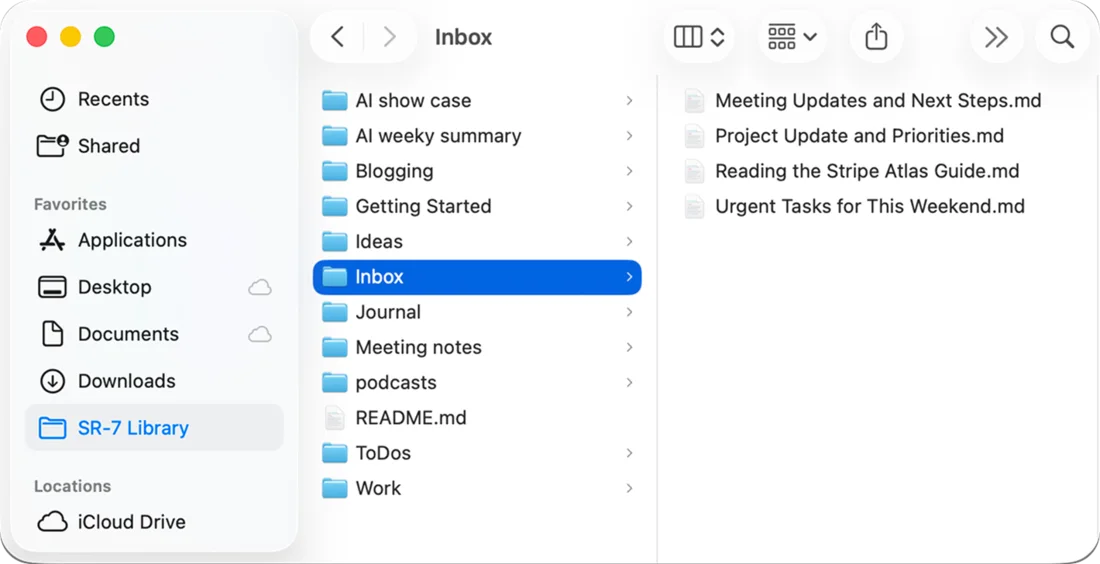
AI tools · Mac
Ask your recordings
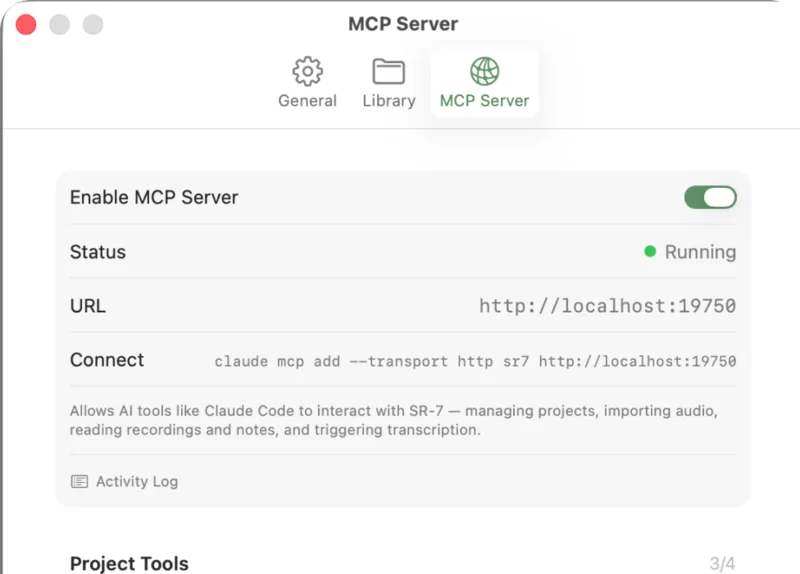
On the Mac, SR-7 runs a local MCP server with 20 tools. Connect Claude Code or any other MCP client and it can search your archive, read transcripts and summaries, move recordings into projects and create notes.
The server is off until you switch it on in Settings, and it listens only on your Mac, at 127.0.0.1. Four tools start switched off, among them empty_trash and delete_recording. You can turn any tool off, and an activity log lists every call.
claude mcp add --transport http sr7 http://localhost:19750 - list_projects
- create_project
- rename_project
- delete_project, off by default
- list_recordings
- get_recording
- search
- create_note
- create_notes
- update_recording
- move_recording
- favorite_recording
- delete_recording, off by default
- restore_recording
- empty_trash, off by default
- import_audio
- transcribe
- generate_insights
- get_library_info, off by default
- export_markdown
Struck through: off until you switch them on in Settings. What each tool does
Hardware
Works with the TP-7 and other recorders
The teenage engineering TP-7 records excellent audio and gives it no transcript. Mount it on your Mac with Field Kit, drag the memos into SR-7, and each one is transcribed, titled and summarized like a recording made in the app.
Audio from any other recorder comes in the same way. Import from the Files app on iPhone and iPad, or drag files in or press ⌘O on the Mac.
MP3, M4A and AAC files are kept as they are. WAV, AIFF, CAF, FLAC and ALAC files are converted to AAC on import.
TP-7 tipNewer TP-7 firmware turns the dedicated Memo mode off by default. Switch it on in the TP-7 settings so voice memos are stored apart from your other recordings, which makes them easy to find and import.
ImportWith Transcribe automatically on import switched on, as it is to begin with, each file is transcribed as it arrives. Several files at once are transcribed one after another.
Compare
How SR-7 compares
Five apps people use to record their own voice or transcribe it, on the points that decide which one fits. Details about the other apps come from each company's own pages, checked on 28 August 2026.
| Point | SR-7 | Apple Voice Memos | Just Press Record | Otter | MacWhisper |
|---|---|---|---|---|---|
| Best at | Thinking out loud, into an archive you can search | Occasional recordings, already on your phone | The fastest capture, including from Apple Watch | Meetings with other people | Transcribing audio and video files you already have |
| Price | $7.99 once, iPhone, iPad and Mac | Free, preinstalled | $6.99 once, universal | Free tier with limits; Pro $8.33 to $16.99 per user per month | Free tier; Pro €64 once |
| Transcription runs | On device | On device | On device | In the cloud (AWS, US) | On device, with optional cloud AI on your own API keys |
| Title and summary | Automatic, on device, for every recording | By hand, with Apple Intelligence Writing Tools on the Mac | None | Cloud AI summaries and AI Chat | None without your own cloud API keys |
| What you get out | On the Mac, a markdown file with YAML front matter in a folder you choose | Audio through the share sheet; transcript text copied by hand | Audio in M4A, WAV or AIF, plus an in-app transcript | TXT, DOCX, PDF or SRT export per conversation | .srt, .vtt, .txt, .md, .pdf, .html or .docx per file |
| AI tool access | Local MCP server with 20 tools (Mac) | None | None | API on Enterprise plans | None |
| Meetings and speaker labels | No | No | No | Yes, a bot for Zoom, Google Meet and Teams | Speaker recognition, and meeting recording for Zoom, Teams, Webex and Discord |
| Platforms | iPhone, iPad and Mac on OS 26 | iPhone, iPad and Mac | iPhone, iPad, Mac, Apple Watch and Apple Vision | Web, iOS and Android | Mac (iPhone and iPad via the separate Whisper Transcription app) |
If your recordings are meetings with other people, Otter is the better tool. Its bot joins calls and labels speakers. SR-7 is built for your own voice.
In detail: SR-7 vs Apple Voice Memos, SR-7 vs Just Press Record, SR-7 vs Otter and SR-7 vs MacWhisper.
Price
$7.99once
One purchase covers iPhone, iPad and Mac, and Family Sharing extends it to up to six people. There is no subscription, no in-app purchase, no minute allowance and no account to create.
- Runs on
- iOS 26, iPadOS 26 and macOS 26. The Mac app needs Apple silicon (M1 or later).
- On-device AI
- Titles and summaries need Apple Intelligence: an M1 or later Mac or iPad, or an iPhone that supports it. Transcription works without it.
- Mac only
- The MCP server and the markdown library folder
- Imports
- WAV, AIFF, MP3, M4A, AAC, CAF, FLAC and ALAC
- Recording length
- Up to 180 minutes per recording, set in Settings (60 to begin with)
- Privacy label
- Data Not Collected
Questions
Questions people ask before buying
- Where do transcription and summaries run?
- On your device. SR-7 transcribes with Apple's on-device speech framework and writes titles and summaries with Apple's on-device models. Nothing goes to us; if you switch on iCloud sync, your recordings sync through your own iCloud.
- Which languages does it transcribe?
- The languages Apple's on-device transcription supports on your OS version. By default SR-7 uses your device's language. We don't publish a fixed list, because the list comes from Apple.
- Is SR-7 a meeting recorder?
- No. SR-7 is a personal recorder for your own voice. It doesn't join calls or label speakers. If you need a bot in Zoom, Google Meet or Teams, Otter is built for that.
- What do I need to run it?
- iOS 26, iPadOS 26 or macOS 26, and on the Mac an Apple silicon chip (M1 or later). Titles and summaries need Apple Intelligence switched on; transcription works without it.
- Can I use it with Obsidian?
- Yes, on the Mac. Choose a location inside your vault for the markdown library and SR-7 creates its SR-7 Library folder there, with a note per recording and YAML front matter on top. SR-7 manages that folder and rewrites its files when a recording changes, so edit in SR-7 and read in Obsidian.
- Can my AI tools read my recordings?
- On the Mac, yes. SR-7 runs a local MCP server with 20 tools, off until you switch it on, so Claude Code or any MCP client can search your archive and read transcripts. Any tool with file access can also read the markdown library.
- Where are my recordings stored?
- On your device. If you switch on iCloud sync, CloudKit keeps them in step across your iPhone, iPad and Mac through your own iCloud account, and you choose whether audio files are included.
- What does it cost?
- $7.99, once, for iPhone, iPad and Mac together, and Family Sharing covers up to six people. There is no subscription and no in-app purchase.
- How long can a recording be?
- Up to 180 minutes. The limit is a setting, from 15 to 180 minutes, and starts at 60; recording stops when it is reached.